Local AI Video Generation: Start with Wan 2.2
Local AI Video Generation: Start with Wan 2.2
Introduction
In 2026, local AI video generation is genuinely usable: open-source models produce ~5-second 720p clips on consumer GPUs, and there are low-barrier options for 8GB VRAM. To be honest, though — it is not yet “type a sentence, get a one-minute film.” You have to make explicit trade-offs between speed, VRAM, and what’s fun to try.
This tutorial explains how to choose among the mainstream 2026 open-source video models using ComfyUI (Chinese guide), then walks through Alibaba’s Wan 2.2 as the main path: text-to-video, image-to-video, and first-and-last-frame interpolation.
1. Choosing an Open-Source Video Model in 2026
| Model | Maker | License | Params | Min VRAM | Highlights |
|---|---|---|---|---|---|
| Wan 2.2 | Alibaba | Apache 2.0 | 5B / 14B (MoE active) | 8GB (5B) | Strong Chinese, cinematic aesthetics, native ComfyUI, official 4-step acceleration |
| LTX-2 / 2.3 | Lightricks | Apache 2.0 | ~2B | 8GB | Fastest, 20s videos, first open-source audio-synced generation |
| HunyuanVideo | Tencent | Custom | 13B | 16GB | Most cinematic, but slow and VRAM-hungry |
| CogVideoX | Zhipu | Apache 2.0 | 2B / 5B | 8GB (2B) | Good narrative understanding, conservative motion |
| Mochi 1 | Genmo | Apache 2.0 | 10B | 24GB | Physically realistic, research-oriented |
Recommendations:
- 8GB VRAM (RTX 4060 class) → Wan 2.2 TI2V-5B or quantized LTX-2
- 12–16GB → Wan 2.2 5B full precision, Wan 2.1 1.3B up to 720p
- 24GB → Wan 2.2 14B FP8 (480p) or GGUF Q5 (720p)
- Chinese prompts → Wan family (UMT5 multilingual encoder); English-first → LTX’s speed edge
Closed-source APIs (Sora, Seedance, Kling) are higher quality but you can’t get the weights — that’s the fundamental boundary of local generation.
2. Environment Prep
- ComfyUI installed (Chinese guide; use a recent build — video nodes are native now)
- NVIDIA GPU + driver + CUDA (see Docker GPU Containers, Chinese)
- Disk: video models run 20–90GB each — reserve 100GB+ to be safe
3. Main Path: Wan 2.2 TI2V-5B (8GB Entry Point)
The 5B hybrid model (TI2V) does both text-to-video and image-to-video in one checkpoint; combined with ComfyUI’s native offloading it fits in 8GB VRAM — the lowest overall barrier in 2026.
3.1 Download the models
| File | Purpose | Folder |
|---|---|---|
wan2.2_ti2v_5B_fp16.safetensors | Main generation model | models/diffusion_models/ |
umt5_xxl_fp8_e4m3fn_scaled.safetensors | Text encoder (multilingual) | models/text_encoders/ |
wan2.2_vae.safetensors | Video VAE (5B-specific, 48 channels) | models/vae/ |
Sources: HuggingFace Wan-AI, Comfy-Org model page; in China use the hf-mirror endpoint.
3.2 Load the official workflow
- ComfyUI menu → Workflow → Browse templates → Video → pick
Wan2.2 5B video generation - Confirm the three nodes point at the three files above
- Positive prompt = what’s on screen: subject + action + camera + lighting
Example prompt:
An orange tabby cat basking on a windowsill, breeze swaying the curtains,
camera slowly pushing in, golden afternoon light, realistic style, cinematic
- (Optional) Image-to-video: Ctrl+B to enable
Load Image, upload a start frame — it drives the video as the first frame - Click Run and wait (480p 5s on 8GB takes roughly 5–10 minutes)
3.3 Output files
Outputs default to ComfyUI/output/ as mp4 (Save Video node) or gif.
4. Advanced: Wan 2.2 14B High-Quality Path
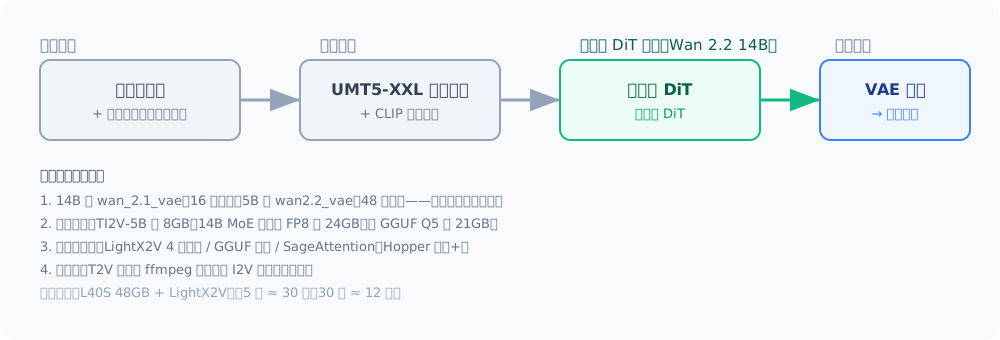
For better visuals and complex motion, use 14B (MoE dual-expert: 27B total params, 14B active per step; high/low-noise experts handle layout and detail respectively).
4.1 File checklist
| File | Folder |
|---|---|
wan2.2_t2v_high_noise_14B_fp8_scaled.safetensors | models/diffusion_models/ |
wan2.2_t2v_low_noise_14B_fp8_scaled.safetensors | models/diffusion_models/ |
umt5_xxl_fp8_e4m3fn_scaled.safetensors | models/text_encoders/ |
wan_2.1_vae.safetensors | models/vae/ |
Note: the 14B uses
wan_2.1_vae(16 channels); using the 5B’swan2.2_vae(48 channels) fails immediately with a channel-mismatch error — this is the #1 gotcha.
Workflows are in the template library too: Wan2.2 14B T2V (text-to-video) / Wan2.2 14B I2V (image-to-video) / Wan2.2 14B FLF2V (first-last-frame).
- 14B VRAM: FP8 ≈ 24GB (480p); GGUF Q5 ≈ 21GB, Q3 ≈ 15GB (720p needs 24GB+)
- Speed (L40S 48GB + official LightX2V 4-step): 5s video ≈ 30s, 10s ≈ 2 min, 30s ≈ 12 min — more frames means O(N²) attention slowdown; don’t brute-force long videos in one go
5. Low-VRAM & the Three Speed Tricks
- LightX2V step distillation: official 4-step LoRA cuts sampling from 20–50 steps to 4 — several times faster with minimal quality loss
- GGUF quantization (City96/ComfyUI-GGUF nodes): Q5/Q3 variants cut VRAM significantly — great below 12GB
- SageAttention: installable on Hopper-class GPUs (4090/5090 etc.) for further speed; without it ComfyUI falls back to PyTorch attention, just slower
6. Long Videos: Shot Concatenation vs I2V Chaining
Single-segment generation tops out around 5–10 seconds (beyond that, speed collapses and generation gets unstable). Two routes:
- Path A: T2V multi-shot concatenation — split the script into 5-second shots, generate each, then join with ffmpeg; good for narratives/different scenes
- Path B: I2V chaining — use each segment’s last frame as the next segment’s first frame for continuity; good for extending the same scene
# ffmpeg concat example (same-resolution mp4s)
ffmpeg -f concat -safe 0 -i list.txt -c copy output.mp4
FAQ
Is 8GB enough? Yes — Wan 2.2 5B (with offloading) or quantized LTX-2 both run 480p; a 4060 took ~4 minutes for a 5-second 480p clip (Wan 2.1 1.3B reference).
Getting expected input ... to have 48 channels, but got 16 channels? Wrong VAE: 14B pairs with wan_2.1_vae, 5B with wan2.2_vae — swapping always breaks.
Is slow generation normal? Yes. Video is dozens of steps × full-frame attention per step; minutes to tens of minutes for 5s at 480p is reasonable. SageAttention + LightX2V makes it several times faster.
Can it generate audio-synced video? The LTX-2 family can; Wan is visual-only, so add audio in post.
OOM? Drop resolution (480p), drop frame count, use GGUF Q3/Q5, or enable offloading (trade performance for VRAM).
Risks
- Video models are huge and inference-heavy — watch disk space and thermals; monitor GPU temperature during long runs
- Respect laws and platform rules for real-person likeness, others’ works, and commercial use
- Open-source licenses differ (Apache 2.0 / custom) — check each model’s license before commercial use
Next Steps
- Set up the visual environment first → ComfyUI Workflow Basics (Chinese)
- Video frames start from an image → Stable Diffusion Deployment (Chinese)
- Voice-over and music for video → Local TTS: Make Your AI Speak
- Can’t run big models? Isolate with Docker GPU Containers (Chinese) or rent cloud GPUs
This is a pilot English translation. The rest of the tutorial library is available in Chinese at the main tutorial hub.
评论
Comments are powered by GitHub Discussions — sign in with a GitHub account to join the conversation.